How Much RAM Do You Need? 8GB vs 16GB vs 32GB Explained
16GB of RAM is the sweet spot for most people, but gamers, creators and AI users may need more. Here's how much memory you need for Windows, Mac and gaming.
In this article
- What does RAM do?
- How much RAM do you need? Quick recommendations
- RAM for Windows PCs
- RAM for Macs
- RAM for gaming
- RAM for AI, creative work and development
- Signs you need more RAM
- How to check memory use
- Other RAM details worth knowing
- Frequently asked questions
- Is 8GB of RAM enough?
- Is 32GB of RAM overkill?
- Does more RAM make a computer faster?
- Can I mix different RAM sticks?
- How much RAM does a phone need?
- The bottom line
How much RAM do you need? For most people buying a Windows laptop or Mac today, 16GB is the sweet spot. It handles a browser full of tabs, office apps, video calls and light photo editing comfortably, and it is the minimum for Microsoft's Copilot+ AI features. 8GB is now only enough for very light use or Chromebooks, while 32GB or more makes sense for gamers, creators, developers and anyone running AI models locally.
Below we explain what RAM actually does, give recommendations by use case, and show you how to check whether your current computer is running short.
What does RAM do?
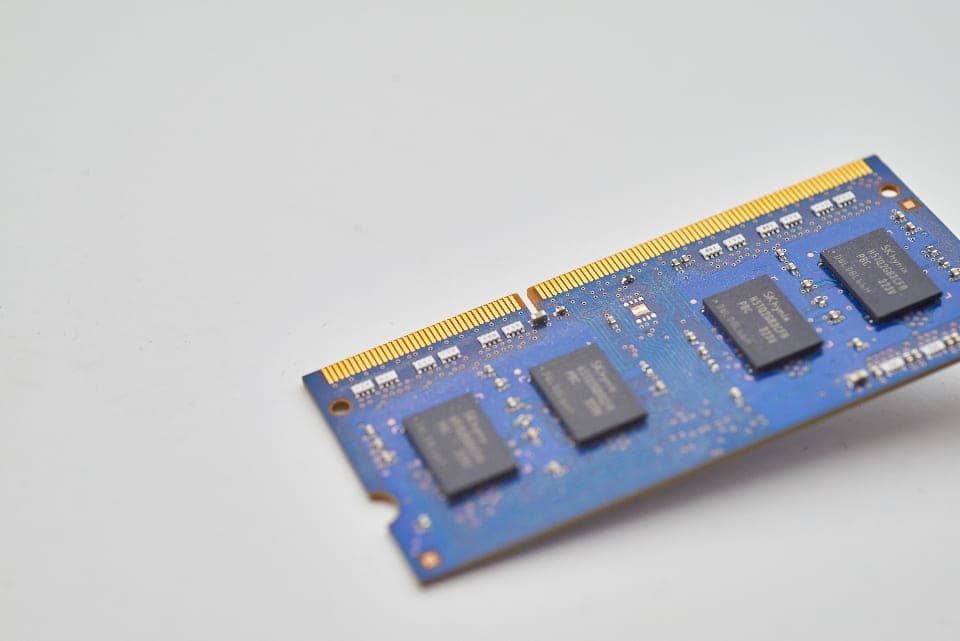
RAM (random access memory) is your computer's short-term working space. When you open an app, a browser tab or a file, the data it needs right now is loaded into RAM because it is far faster than your storage drive.
A helpful analogy: storage (your SSD) is a filing cabinet, and RAM is your desk. A bigger desk lets you keep more things open and within reach at once. When the desk fills up, your computer has to keep shuffling things back to the filing cabinet, which is called swapping or paging, and everything slows down.
RAM is not the same as storage. A laptop with "16GB RAM and 512GB SSD" has 16GB of working memory and 512GB of space for files and apps. If you are running out of space for photos and downloads, you need more storage, not more RAM.
How much RAM do you need? Quick recommendations
| RAM | Good for | Who should buy it |
|---|---|---|
| 8GB | Web browsing, email, streaming, basic documents | Light users, Chromebooks, secondary devices. Tight for modern Windows multitasking. |
| 16GB | Heavy browsing, office work, video calls, school, light photo and video editing, most games | Most people. The best default for a new laptop or desktop. |
| 32GB | Serious multitasking, modern gaming with apps in the background, 4K video editing, large photo libraries, software development, virtual machines | Gamers, creators, developers and power users who keep machines for many years. |
| 64GB and up | Professional 3D, large video projects, data work, running large AI models locally | Professionals with specific, demanding workloads. |
RAM for Windows PCs
Microsoft's official Windows 11 specifications list 4GB of RAM as the minimum. That is enough to install and boot Windows, but not enough for a pleasant experience with today's browsers and apps.
In practice:
- 8GB works for basic tasks, but you will notice slowdowns with many browser tabs plus a video call.
- 16GB is the comfortable baseline for a new Windows laptop, and Microsoft requires at least 16GB for Copilot+ PCs, according to the same specifications page. Learn more about those machines in our explainer on NPUs and AI PCs.
- 32GB is worth it if you game, edit video or run many demanding apps at once.
If your existing PC feels sluggish, RAM is only one possible cause. Our guide to speeding up a slow Windows 11 PC covers startup apps, storage and other fixes to try before upgrading.
RAM for Macs
Apple Silicon Macs use unified memory, which is shared between the CPU, GPU and Neural Engine. macOS manages memory efficiently and compresses data before swapping, so Macs often feel smooth with less RAM than a comparable PC. But unified memory also has to cover graphics work, so it is not a reason to skimp.
Apple raised the base memory of the MacBook Air to 16GB in late 2024, and 16GB is a sensible minimum for any new Mac. Choose 24GB or 32GB if you edit video, work with large photo libraries, write code with multiple tools running or plan to run local AI models. Mac memory cannot be upgraded after purchase, so decide carefully.
Running low on space is a separate problem; see our guide to freeing up storage space on a Mac.
RAM for gaming
16GB remains the baseline for PC gaming, and many games run well with it. However, recent big-budget games can use a lot of memory, and gamers often run Discord, a browser and streaming or recording software at the same time. 32GB gives you headroom and is a popular choice for new gaming PCs.
Remember that your graphics card has its own video memory (VRAM). VRAM affects texture quality and resolution more than system RAM does, so a balanced build matters.
RAM for AI, creative work and development
- Video editing: 16GB for 1080p, 32GB or more for 4K and multi-layer timelines.
- Photo editing: 16GB for casual editing, 32GB for large RAW files and heavy layering.
- Software development: 16GB minimum, 32GB if you use containers, virtual machines or several heavy tools at once.
- Local AI models: The model has to fit in memory (RAM, VRAM or Mac unified memory). Small models run on 16GB, but larger ones need 32GB, 64GB or more. Using cloud AI tools in a browser needs no extra RAM.
Signs you need more RAM
- Your computer slows down badly when you have many tabs or apps open.
- Browser tabs reload when you switch back to them.
- Apps take a long time to switch between.
- Your storage drive is constantly busy even when you are not saving files.
How to check memory use
- Windows: Press Ctrl + Shift + Esc to open Task Manager, select Performance > Memory. If usage regularly sits above about 85 to 90% during normal work, more RAM would likely help.
- Mac: Open Activity Monitor (in Applications > Utilities) and click the Memory tab. Watch the Memory Pressure graph: green is fine, yellow means memory is getting tight, and red means you need more.
Other RAM details worth knowing
- Upgradeability: Many thin laptops and all Apple Silicon Macs have memory soldered to the board, so you cannot add more later. Buy what you will need for the next several years.
- Dual-channel memory: On desktops and upgradeable laptops, two matching sticks (for example, 2 x 8GB) usually perform better than one stick of the same total size.
- Type and speed: Newer systems use DDR5 or LPDDR5/LPDDR5X memory. Capacity matters more than small speed differences for most people.
- Prices fluctuate: Memory prices have risen sharply since late 2025 as AI data centers soaked up supply, which has pushed up the cost of RAM upgrades and higher-memory laptop configurations. If you find a good deal on the right amount, it may be worth taking.
Shopping for a new machine? Our best laptops for students guide factors memory into every pick.
Frequently asked questions
Is 8GB of RAM enough?
For light browsing, email and streaming, yes. For a primary Windows laptop with heavy multitasking or video calls, 8GB often feels slow. Choose 16GB if you can.
Is 32GB of RAM overkill?
For basic use, yes. For gaming, creative work, development or keeping a computer for many years, 32GB is a reasonable investment.
Does more RAM make a computer faster?
Only if you are running out. Once you have enough RAM for your workload, adding more will not make apps noticeably faster.
Can I mix different RAM sticks?
It often works, but mismatched sticks can run at the slower module's speed or cause stability issues. Matching pairs are the safest choice.
How much RAM does a phone need?
Phones manage memory differently, and manufacturers tune their software for the hardware. Look at overall performance and software support rather than RAM alone.
The bottom line
For most people, 16GB of RAM is the right amount for a new computer. Pick 8GB only for very light use, and choose 32GB or more for gaming, creative work, development or local AI. Because many laptops cannot be upgraded later, it pays to buy a little more than you need today. Explore more buying advice in our Laptops & PCs section.



0 Comments
Join the discussion. Comments are moderated and your email is never published.